How to Transcribe Audio on iPhone (3 Ways): Voice Memos, Notes, and Audio You Receive
Published by @SoNiceInfo at 11/14/2026
A recorded meeting or lecture, a voice message from your family — there are many times you want to read audio as text. iPhone has transcription built into Voice Memos and Notes, and an app can transcribe audio files you receive. This article shows three ways and when each one fits. The requirements for the built-in features are from Apple's user guide.
Comparison
| Method | Audio it can transcribe | Requirements | Finding it later |
|---|---|---|---|
| Voice Memories (recommended) | Voice messages you receive, audio and video files, Voice Memos recordings | iOS 18 or later. The free plan transcribes up to 5 a day | Search transcriptions, tags and dates |
| Voice Memos (built in) | Recordings made in Voice Memos | iPhone 12 or later, iOS 18 or later, a supported language | Search titles and transcriptions |
| Notes (built in) | Recordings made inside a note | iPhone 12 or later, iOS 18 or later, a supported language | Search the transcript inside the note |
RecommendedMethod 1: Transcribe with an app (Voice Memories)
Voice Memories is an iPhone app, developed by the author, that saves voice messages and audio files you receive and keeps them with their transcriptions. Transcription in Voice Memos and Notes covers what you record in those apps, so this helps with audio that arrives later.
Share the audio
Open the share sheet for a voice message in a messaging app, an audio file in Files, a Voice Memos recording, and so on.
Choose Voice Memories and tap Open
Tap Voice Memories in the share sheet, then tap Open when saving finishes. You can send up to 10 at a time.
Transcribed automatically
The voices are added to the list and transcribed one at a time in the order you saved them. Keep Voice Memories open until it finishes.
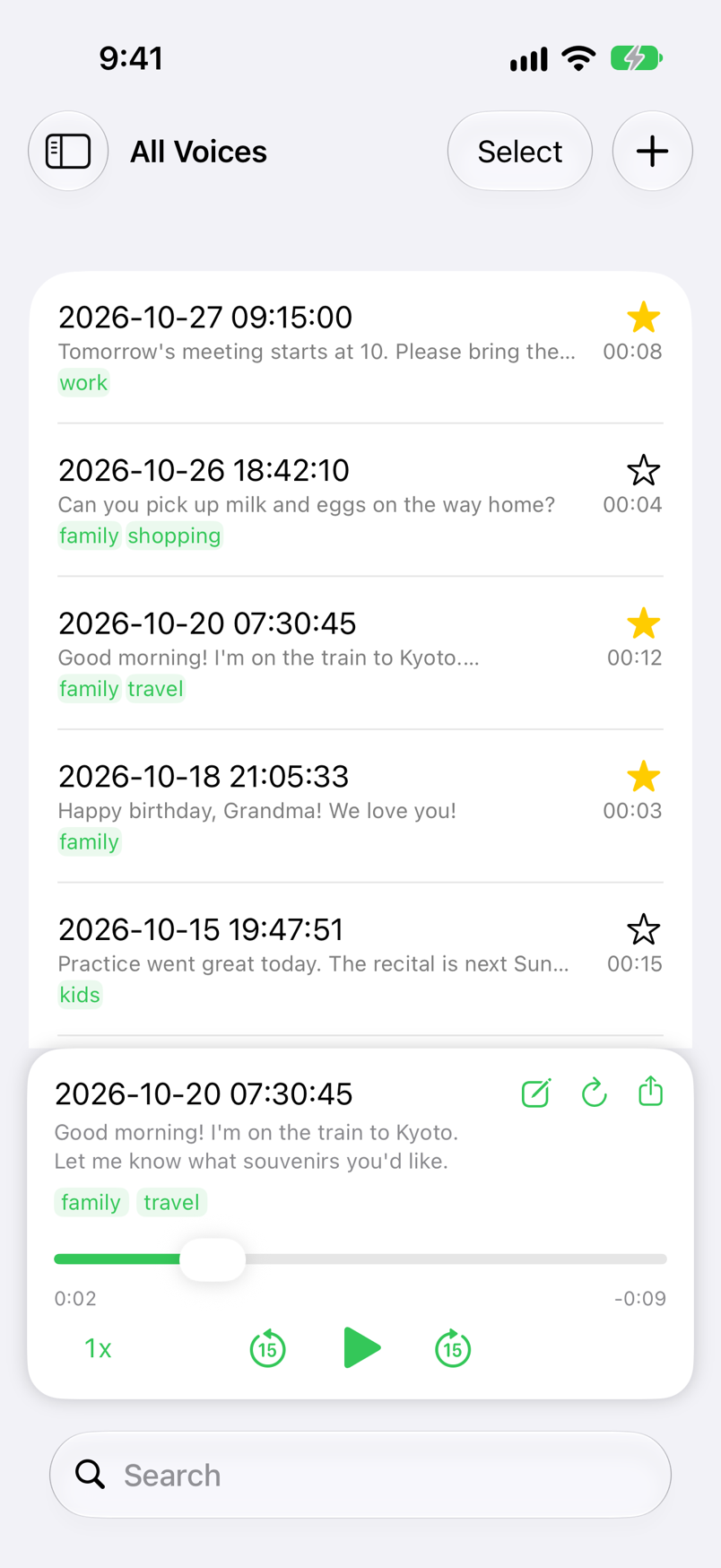
- Files and videos too ─ Use + at the top right of the list to import audio and video files from the Files app or videos from the Photos app. For videos, only the sound is transcribed.
- Long recordings ─ Recordings longer than a minute are split at pauses, recognized in order, and joined together.
- Language ─ It uses Apple's speech recognition. The language is set from your iPhone's language at first; to transcribe another language, change Locale in Settings first.
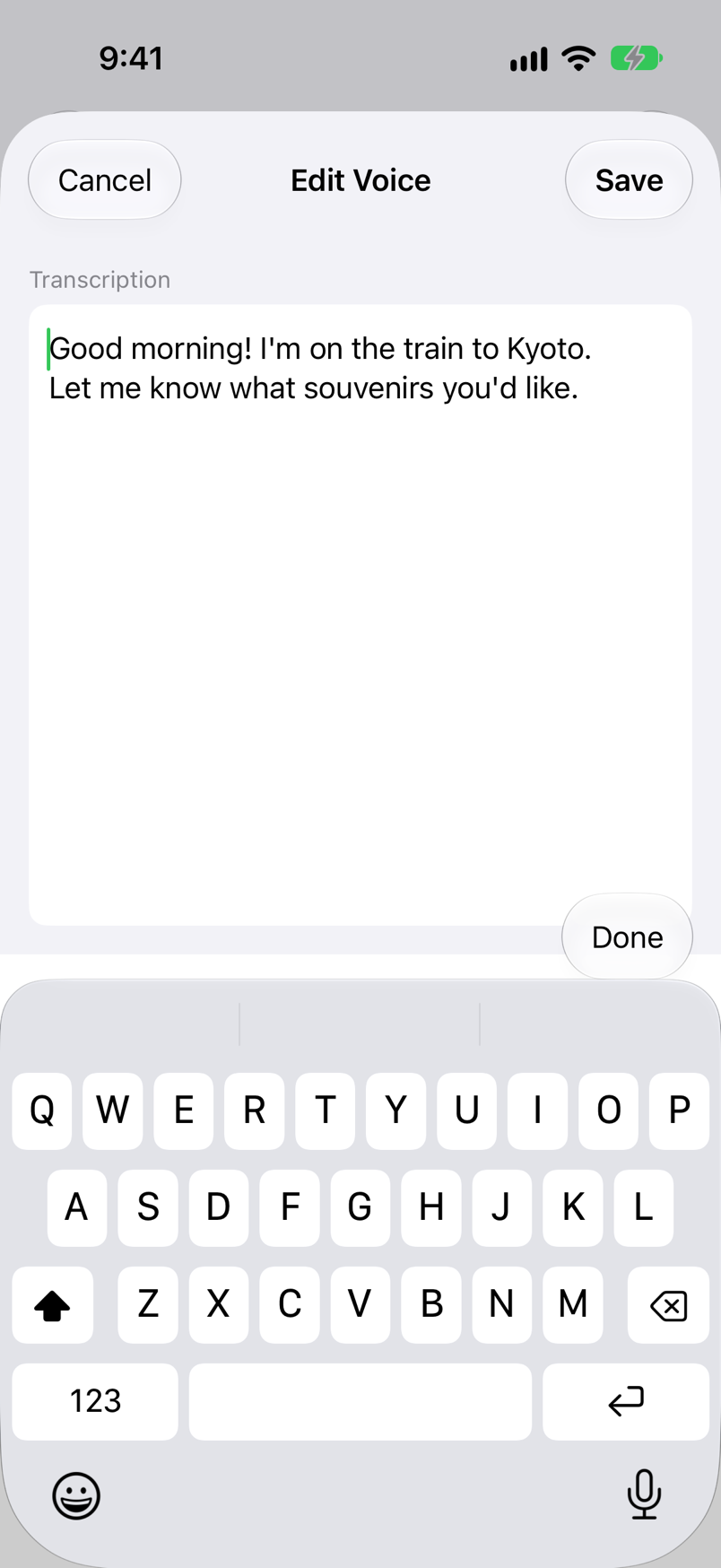
- Fix or redo ─ Tap the transcription to open the edit screen and fix mistakes. Tap ↻ in the player to recognize the voice again from the start.
- On your device only ─ Turn on Run on Device in Settings to transcribe without sending audio to Apple's servers.
Saving, playing and organizing are free. The free plan transcribes up to 5 voices a day; Premium, a one-time purchase, makes it unlimited and removes ads. The steps for saving LINE voice messages are in How to save LINE voice messages on iPhone.
iPhone & iPad · iOS 18 or later · Free (with ads) · No sign-up
No extra appMethod 2: View Transcript in Voice Memos
On iOS 18 or later, the Voice Memos app can transcribe the speech in your recordings. You can view the transcription while you're recording or afterward.
Tap the recording
Open the Voice Memos app and tap the recording whose transcript you want to see.
Choose View Transcript
Open the recording's menu and choose View Transcript. You can also select part of the text and tap Copy.
Copy Transcript for the whole text
Choose Copy Transcript in the same menu to copy the entire transcript, then paste it into Mail, Notes and so on.
- Requirements ─ Apple's user guide says it is available on iPhone 12 or later in English, Spanish, Portuguese, Italian, French, German, Japanese, Korean, Simplified Chinese, and Traditional Chinese, and not in all countries or regions.
- Older recordings ─ A recording made in Voice Memos on iOS 17 or earlier is transcribed automatically when you open it, if it includes speech.
- Search ─ Enter text in the search field and the list shows only recordings with that text in the title or the transcription.
No extra appMethod 3: Record and transcribe in Notes
In the Notes app, you can record audio inside a note and have the spoken words transcribed. It suits meetings and lectures where you want to take notes while recording.
Tap Record Audio
Open a note in the Notes app and choose Record Audio from the toolbar button.
Record
Start recording. You can see the live transcript while recording, and swipe down from the top of the screen to take notes.
Review the transcript
Tap the audio recording to show its transcript. Tap any text to play the audio from that point.
- Using the transcript ─ From the menu on the transcript screen, choose Add Transcript to Note, Copy Transcript, or Find in Transcript.
- Requirements ─ Apple's user guide says it is available on iPhone 12 and later when the device language is set to English, Spanish, Portuguese, Italian, French, German, Japanese, Korean, Simplified Chinese, or Traditional Chinese.
- Deleting ─ Deleting the audio recording also deletes the transcript.
Which method is right for you
- You want to read voices and audio files from family and friends ─ Voice Memories. It saves the audio you receive and keeps it with a transcription.
- You want text from a meeting or lecture you recorded ─ Voice Memos. You can watch the transcript while recording, and it suits long recordings.
- You want the recording and your notes in one place ─ Notes. You can add the transcript straight to the note.
- Your iPhone doesn't meet the built-in requirements ─ Voice Memories. On iOS 18, it runs on models older than iPhone 12 too.
FAQ
Q. Why don't I see View Transcript in Voice Memos?
Apple says audio transcription in Voice Memos is available on iPhone 12 or later in English, Spanish, Portuguese, Italian, French, German, Japanese, Korean, Simplified Chinese, and Traditional Chinese, and not in all countries or regions. It doesn't appear when your model or language falls outside that. On iOS earlier than 18, update first.
Q. How can I transcribe on a model older than iPhone 12, such as iPhone 11?
Transcription in Voice Memos and Notes needs iPhone 12 or later. Voice Memories runs on any iPhone with iOS 18 or later, so on iOS 18 you can share a recording to it and have it transcribed.
Q. How do I paste the transcript into another app?
In Voice Memos, choose Copy Transcript from the recording's menu to copy the whole text. In Notes, choose Add Transcript to Note or Copy Transcript from the menu on the transcript screen. In Voice Memories, tap the transcription in the player to open the edit screen, then select and copy the text.
Q. Is my audio sent anywhere to be transcribed?
Voice Memories uses Apple's speech recognition. With Run on Device turned on in Settings, audio is transcribed on your iPhone only. With it off, audio may be sent to Apple for recognition. Either way, nothing is sent to SoNice! servers.
Q. Can I transcribe a long recording, such as a one-hour meeting?
Voice Memos and Notes show the transcript while you record. Voice Memories splits recordings longer than a minute at pauses, recognizes the parts in order, and joins them. Voice Memories has to stay open while it transcribes, so for long recordings the built-in Voice Memos and Notes features fit better.
Summary
Audio you record yourself can be turned into text with View Transcript in Voice Memos or Record Audio in Notes (iPhone 12 or later, iOS 18 or later). Audio that arrives later, such as voice messages and audio files, is transcribed automatically when you save it to Voice Memories, and you can then find it by words.
iPhone & iPad · iOS 18 or later · Free (with ads) · No sign-up